Define DHCP
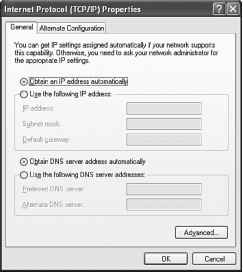
Dynamic Host Configuration Protocol (DHCP) is a software utility used to dynamically assign IP addresses to network devices. This dynamic process eliminates the need to manually assign IP addresses. A DHCP server can be set up and the hosts can be configured to automatically obtain an IP address. When a computer is set to obtain an IP address automatically, all the other IP addressing configuration boxes are dimmed, as shown in Figure 8-9. The server maintains a list of IP addresses to assign, and it manages the process so that every device on the network receives a unique IP address. Each address is held for a predetermined amount of time. When the time expires, the DHCP server can use this address for any computer that joins the network.
Figure 8-9 TCP/IP Properties
This is the IP address information that a DHCP server can assign to hosts:
■ Subnet mask
■ Default gateway
■ Optional values, such as a Domain Name System (DNS) server address
The DHCP server receives a request from a host. The server then selects IP address information from a set of predefined addresses that are stored in a database. After the IP address information is selected, the DHCP server offers these values to the requesting host on the network. If the host accepts the offer, the DHCP server leases the IP address for a specific period of time.
Using a DHCP server simplifies the administration of a network because the software keeps track of IP addresses. Automatically configuring TCP/IP also reduces the possibility of assigning duplicate or invalid IP addresses. Before a computer on the network can take advantage of the DHCP server services, the computer must be able to identify the server on the local network. You can configure a computer to accept an IP address from a DHCP server by clicking the Obtain an IP address automatically option in the NIC configuration window, as shown in Figure 8-9.
If your computer cannot communicate with the DHCP server to obtain an IP address, the Windows operating system automatically assigns a private IP address. If your computer is assigned an IP address in the range of 169.254.0.0 to 169.254.255.255, it can communicate with only other computers in the same range. An example of when these private addresses would be useful is in a classroom lab where you want to prevent access outside to your network. This operating system feature is called Automatic Private IP Addressing (APIPA). APIPA continually requests an IP address from a DHCP server for your computer.
Continue reading here: Describe Internet Protocols and Applications
Was this article helpful?
Readers' Questions
-
dehab1 month ago
- Reply
-
Pearl1 month ago
- Reply
-
Gioele1 month ago
- Reply
-
conrad goodbody2 months ago
- Reply
-
amalda bunce3 months ago
- Reply
-
kenneth4 months ago
- Reply
-
Edward Gibson5 months ago
- Reply
-
jamie nichols6 months ago
- Reply
-
Sabrina7 months ago
- Reply
-
Keegan7 months ago
- Reply
-
Miriam7 months ago
- Reply
-
samantha7 months ago
- Reply
-
MICHAEL BRIDGES7 months ago
- Reply
-
zufan tewelde7 months ago
- Reply
-
marilyn7 months ago
- Reply
-
rory7 months ago
- Reply
-
gladys7 months ago
- Reply
-
klaudia7 months ago
- Reply
-
ubalda8 months ago
- Reply
-
johanna8 months ago
- Reply
-
rebecca8 months ago
- Reply
-
RUBEN8 months ago
- Reply
-
frederick8 months ago
- Reply
-
cindy8 months ago
- Reply
-
alesha8 months ago
- Reply
-
Annikki8 months ago
- Reply