Operating Systems
Describe Repairs for Laptops and Portable Devices


When a laptop or portable device begins to malfunction, what should you do The customer can replace some parts of a laptop, typically called Customer-Replaceable Units (CRU). CRUs include such components as the laptop battery and additional RAM. Parts that the customer should not replace are called Field-Replaceable Units (FRU). FRUs include such components as the laptop motherboard, LCD display, and keyboard. In many cases, the device may need to be returned to the place of purchase, a...
Install a CPU and a Heat Sink Fan Assembly

The central processing unit (CPU) and the heat sink fan assembly may be installed on the motherboard before the motherboard is placed in the computer case. Figure 3-2 shows a close-up view of the CPU and the motherboard. The CPU and motherboard are sensitive to electrostatic discharge. When handling a CPU and motherboard, make sure that you place them on a grounded antistatic mat. You should wear an antistatic wrist strap while working with these components. When handling a CPU, do not touch...
Identify the Names Purposes and Characteristics of Internal Cables

Drives require both a power cable and a data cable. A power supply has a SATA power connector for SATA drives, a Molex power connector for PATA drives, and a Berg four-pin connector for floppy drives. The buttons and the LED lights on the front of the case connect to the motherboard with the front panel cables. Figure 1-10 shows some examples of internal PC cables. Data cables connect drives to the drive controller, which is located on an adapter card or the motherboard. Some common types of...
Explain Wireless Ethernet Standards
IEEE 802.11 is the standard that specifies connectivity for wireless networks. IEEE 802.11, or Wi-Fi, refers to the collective group of standards 802.11a, 802.11b, 802.11g, and 802.11n. These protocols specify the frequencies, speeds, and other capabilities of the different Wi-Fi standards 802.11a Devices conforming to the 802.11a standard allow WLANs to achieve data rates as high as 54 Mbps. IEEE 802.11a devices operate in the 5-GHz radio frequency range and within a maximum range of 150 feet...
Describe the Components Found on the Outside of the Laptop

Laptop and desktop computers use the same types of ports so that peripherals can be interchangeable. These ports are specifically designed for connecting peripherals and providing network connectivity and audio access. Ports, connections, and drives are located on the front, back, and sides of the laptop because of the compact design. Laptops contain PC Card or ExpressCard slots to add functionality such as more memory, a modem, or a network connection. You learn more about PC Card and...
Determine Protocols and Network Applications
When designing a network, you must determine which protocols will be used. Some protocols are proprietary and work on only specific equipment, and others are open standards and work on a variety of equipment. Here are the details of the various network protocols Transmission Control Protocol Internet Protocol (TCP IP) represents a set of public standards that specify how packets of information are exchanged between computers over one or more networks. The TCP IP suite of protocols has become...
Define Viruses Worms and Trojan Horses
Computer viruses are created with malicious intent and sent by attackers. A virus is attached to small pieces of computer code, software, or documents. The virus executes when the software is run on a computer. If the virus spreads to other computers, those computers could continue to spread the virus. A virus is transferred to another computer through e-mail, file transfers, and instant messaging. The virus hides by attaching itself to a file on the computer. When the file is accessed, the...
Identify the Names Purposes and Characteristics of Motherboards

The motherboard is the main printed circuit board. It contains the buses, or electrical pathways, found in a computer. These buses allow data to travel between the various components that comprise a computer. A motherboard is also known as the system board, backplane, or main board. Figure 1-4 shows a variety of motherboards. The motherboard accommodates the central processing unit (CPU), RAM, expansion slots, heat sink fan assembly, BIOS chip, chip set, and the embedded wires that interconnect...
Describe Internet Protocols and Applications
Internet protocols are sets of rules governing communication within and between computers on a network. Protocol specifications define the format of the messages that are exchanged. A letter sent through the postal system also uses protocols. Part of the protocol specifies where on the envelope the delivery address needs to be written. If the delivery address is written in the wrong place, the letter cannot be delivered. Timing is crucial to network operation....
Digital Subscriber Line DSL
This means that you don't need to dial up each time to connect to the Internet. DSL uses the existing copper telephone lines to provide high-speed digital data communication between end users and telephone companies. Unlike ISDN, in which digital data communication replaces analog voice communication, DSL shares the telephone wire with analog signals. The telephone company limits the bandwidth of the analog voice on the lines. This limit allows the DSL to place...
Define DHCP
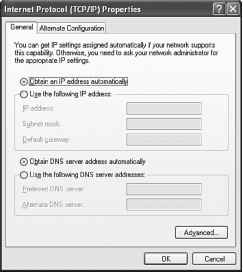
Dynamic Host Configuration Protocol (DHCP) is a software utility used to dynamically assign IP addresses to network devices. This dynamic process eliminates the need to manually assign IP addresses. A DHCP server can be set up and the hosts can be configured to automatically obtain an IP address. When a computer is set to obtain an IP address automatically, all the other IP addressing configuration boxes are dimmed, as shown in Figure 8-9. The server maintains a list of IP addresses to assign,...
Explain Client Server Networks

In a client server network, shown in Figure 8-6, the client requests information or services from the server. The server provides the requested information or service to the client. Servers on a client server network commonly perform some of the processing work for client machines, such as sorting through a database before delivering only the records requested by the client. One example of a client server network is a corporate environment in which employees use a company e-mail server to send,...
Describe How to Manipulate Operating System Files

After you have installed Windows XP, you might want to make changes to the configuration. The following applications are used extensively for postinstallation modifications Msconfig This boot configuration utility allows you to set the programs that will run at startup and to edit configuration files. It also offers simplified control over Windows Services, as shown in Figure 5-16. To access Msconfig, choose Start > Run, type msconfig, and press Enter. Regedit This application allows you to...
Describe Impact Printers

Impactprinters, such as the one shown in Figure 7-3, are basic. Impact printers have print heads that strike the inked ribbon, causing characters to be printed on the paper. Daisy-wheel and dot-matrix are examples of impact printers. In a daisy-wheel printer, the wheel contains the letters, numbers, and special characters. The wheel rotates until the required character is in place, and an electromechanical hammer pushes the character into the ink ribbon. The character then strikes the paper,...
Types of Drive Interfaces
Hard drives and optical drives are manufactured with different interfaces that are used to connect the drive to the computer. When you install a storage drive in a computer, the connection interface on the drive must be the same as the controller on the motherboard. Some common drive interfaces are as follows Integrated Drive Electronics (IDE), also called Advanced Technology Attachment (ATA), is an early drive controller interface that connects computers and hard-disk drives. An IDE interface...
NTFS and FAT32 File System

Windows XP and Windows 2000 use FAT32 and NTFS file systems. Security is one of the most important differences between these file systems. NTFS can support more and larger files than FAT32 and provides more flexible security features for files and folders. Figure 519 shows the file permission properties of NTFS. You can convert partitions from FAT32 to NTFS using the convert.exe utility. Doing this will provide the extra security advantages of NTFS. To restore an NTFS partition to a FAT32...
Disk Management Tools
You must be able to identify which software to use in different situations. Disk management tools help detect and correct disk errors, prepare a disk for data storage, and remove unwanted files. Disk management software includes the following Fdisk A command-line tool used to create and delete partitions on a hard drive and set active, or boot, partitions Formal Used to prepare a hard drive to store information Scandisk or Chkdsk Used to check the integrity of files and folders on a hard drive...
Compare and Contrast Desktop and Laptop Components
Most of the functions that a desktop can perform can also be performed by a laptop. However, these two kinds of computers are built very differently and the parts are not interchangeable. As an example, a airplane and a helicopter can each travel to the same destination, but they cannot be repaired with the same spare parts. This is also true for laptops and desktops. Few components can be shared between desktops and laptops. Desktop components tend to be standardized. They usually meet...
Describe Inkjet Printers

Inkjet printers produce high-quality prints. Inkjet printers are easy to use and inexpensive compared to laser printers. The print quality of an inkjet printer is measured in dots per inch (dpi). Higher dpi numbers provide greater image details. Figure 7-4 shows an all-in-one device that contains an inkjet printer. Figure 7-5 shows inkjet printer components. Inkjet printers use ink-filled cartridges that spray ink onto a page through tiny holes called nozzles. The ink is sprayed in a pattern on...
Compare and Contrast Desktop and Laptop Expansion Capabilities
Expansion capabilities add functionality to a computer. Many expansion devices can be used with both laptops and desktops Expansion devices are attached to laptops and desktops differently. A desktop attaches these devices with USB ports and parallel ports. A laptop attaches these devices with USB ports, parallel ports, and PC Cards. The standardized use of USB and FireWire ports makes it possible to connect many types of external components to laptops, docking stations, port replicators, and...
Partitioning and Formatting

Before installing an operating system on a hard drive, the hard drive must be partitioned and formatted. When a hard drive is partitioned, it is logically divided into one or more areas. When a hard drive is formatted, the partitions are prepared to hold files and applications. During the installation phase, most operating systems automatically partition and format the hard drive. A technician should understand the process relating to hard drive setup. The following terms are used when...
Describe How to Share a Printer

Printer sharing enables multiple users or clients to access a printer that they are not directly connected to. Figure 7-16 shows several computers with different operating systems, all connected to the same shared printer. This arrangement reduces the expense on a network, because fewer printers are required. Setting up printer sharing is simple with Windows XP. The following steps enable a computer to share a printer Step 1. Choose Start > Printers and Faxes. Step 2. Right-click the printer,...
Describe Bluetooth Technology
Bluetooth is a wireless technology that enables devices to communicate over short distances. A Bluetooth device can connect up to seven other Bluetooth devices to create a wireless personal-area network (WPAN). This technical specification is described by the Institute of Electrical and Electronics Engineers (IEEE) 802.15.1 standard. Bluetooth devices can handle voice and data and are ideally suited for connecting the following devices Common Bluetooth characteristics include the following...
Twisted Pair

Twistedpaii is a type of copper cabling that is used for telephone communications and most Ethernet networks. A pair of wires forms a circuit that can transmit data. The pair is twisted to provide protection against crosstalk, which is the noise generated by adjacent pairs of wires in the cable. Pairs of copper wires are encased in color-coded plastic insulation and are twisted together. An outer jacket protects the bundles of twisted pairs. Figure 816 shows a twisted-pair cable. When...
High Definition Multimedia Interface HDMI
A video, plasma, LCD, or DLP projector. HKEY_ The designation at the beginning of Windows Registry boot filenames. host A computer system on a network. Similar to the term node, except that host usually implies a computer system. Node generally applies to any networked system, including access servers and routers. hot-swappable interface Allows peripherals to be changed while the system is running. USB is an example. hub 1) Generally, a term used to describe a Layer 1 device at the center of a...
Explain Bandwidth and Data Transmission

Bandwidth is the amount of data that can be transmitted within a fixed time period. When data is sent over a computer network, it is broken into small chunks called packets. Each packet contains headers. A header is information added to each packet that contains the packet's source and destination. A header also contains information that describes how to put all the packets back together again at the destination. The size of the bandwidth determines the amount of information that can be...
Describe How to Configure Power Settings

One of the most popular features of a laptop is the ability to operate using batteries. This feature allows laptops to operate in locations where AC power is not available or is inconvenient. Advances in power management and battery technology are increasing the time laptop users can remain disconnected from AC power. Current batteries can last from 2 to 10 hours without recharging. Managing the power by configuring the power settings on a laptop is important to ensure that the battery charge...
Identify Standards Organizations
Several worldwide standards organizations are responsible for setting networking standards. Manufacturers use standards as a basis for developing technology, especially communications and networking technologies. Standardizing technology ensures that the devices you use are compatible with other devices using the same technology. Standards groups create, examine, and update standards. These standards are applied to the development of technology to meet the demands for higher bandwidth,...
Hardware Compatibility List

Most operating systems have a hardware compatibility list (HCL) that can be found on the manufacturer's website, as shown in Figure 5-3. These lists provide a detailed inventory of hardware that has been tested and is known to work with the operating system. If any of your customer's existing hardware is not on the list, those components might need to be upgraded to match components on the HCL. Figure 5-3 Hardware Compatibility List Figure 5-3 Hardware Compatibility List An HCL might not be...
Control Hardware Access
The operating system manages the interaction between applications and the hardware. To access and communicate with the hardware, the operating system installs a device driver for each hardware component. A device driver is a small program written by the hardware manufacturer and supplied with the hardware component. When the hardware device is installed, the device driver is also installed, allowing the OS to communicate with the hardware component. The process of assigning system resources and...
Install the Video Adapter Card

A video adapter card, shown in Figure 3-8, is the interface between a computer and a display monitor. An upgraded video adapter card can provide better graphics capabilities for games and graphic programs. Video adapter cards use PCI, AGP, and PCIe expansion slots on the motherboard. Follow these steps for video adapter card installation How To Ol Step 1. Align the video adapter card to the appropriate expansion slot on the motherboard. Step 2. Press down gently on the video adapter card until...
Identify the Names Purposes and Characteristics of Adapter Cards

Adapter cards increase a computer's functionality by adding controllers for specific devices or by replacing malfunctioning ports. Figure 1-8 shows several types of adapter cards. Adapter cards are used to expand and customize the computer's capability NIC connects a computer to a network using a network cable. Wireless NIC connects a computer to a network using radio frequencies. Sound adapter provides audio capability. Video adapter provides graphic capability. Modem adapter connects a...
Upgrade and Configure BIOS
Motherboard manufacturers periodically release updates for their basic input output system (BIOS). The release notes describe the upgrade to the product, compatibility improvements, and the known bugs that have been addressed. Some newer devices only operate properly with an updated BIOS. Early computer BIOS information was contained in ROM chips. To upgrade the BIOS information, the ROM chip had to be replaced, which was not always possible. Modern BIOS chips are EEPROM, or flash memory, which...
Describe the BIOS Setup
The BIOS contains a setup program used to configure settings for hardware devices. The configuration data is saved to a special memory chip called a complementary metal-oxide semiconductor (CMOS). CMOS is maintained by the battery in the computer. If this battery dies, all BIOS setup configuration data is lost. If this occurs, replace the battery and reconfigure the BIOS settings. To enter the BIOS setup program, you must press the proper key or key sequence during POST. Most computers use the...
Identify Beep Codes
POST checks to see that all the hardware in the computer is operating correctly. If a device is malfunctioning, an error or beep code alerts the technician that a problem has occurred. Typically, a single beep denotes that the computer is functioning properly. If a hardware problem exists, the computer may emit a series of beeps. Each BIOS manufacturer uses different codes to indicate hardware problems. Table 3-1 is a sample chart of beep codes. The beep codes for your computer may be...
Identify Common Uses of PDAs and Smartphones
The concept of the PDA has existed since the 1970s. The earliest models were computerized personal organizers designed to have a touch screen and a stylus. Today, some models have both a touch screen and a keyboard and use an operating system that is similar to operating systems used on desktop computers. The PDA is an electronic personal organizer with the following tools The smartphone is a mobile phone with PDA capabilities. Smartphones combine cell phone and computer functions in a single,...
Identify the Names Purposes and Characteristics of Cases and Power Supplies
The computer case provides protection and support for the computer's internal components. All computers need a power supply to convert alternating-current (AC) power from the wall socket into direct-current (DC) power. The size and shape of the computer case is usually determined by the motherboard and other internal components. You can select a large computer case to accommodate additional components that may be required in the future. Other users may select a smaller case that requires...
Identify Common Uses of Laptops
The most significant feature of a laptop is the compact size. The design of the laptop places the keyboard, screen, and internal components into a small, portable case. Another popular feature of the laptop is that it can be used almost anywhere. A rechargeable battery allows the laptop to function when it is disconnected from an AC power source. The first laptops were used primarily by businesspeople who needed to access and enter data when they were away from the office. The use of laptops...
Control Panel Applets
The names of various applets in the Control Panel differ slightly depending on the version of Windows installed. In Windows XP, the icons are grouped into categories Appearance and Themes Applets that control the look of windows Network and Internet Connections Applets that configure all the connection types Add or Remove Programs An applet to add or remove programs and windows components safely Sounds, Speech, and Audio Devices Applets that control all the settings for sound Performance and...
Power Fluctuation Types
Voltage is the force that moves electrons. The potential difference between two points in a circuit is what causes electricity to move. The movement of electrons is called current. Computer circuits need voltage and current to operate electronic components. When the voltage in a computer is not accurate or steady, computer components might not operate correctly. Unsteady voltages are called power fluctuations. The following types of AC power fluctuations can cause data loss or hardware failure...
Define ICMP
Devices on a network use Internet Control Message Protocol (ICMP) to send control and error messages to computers and servers. ICMP has several different uses, such as announcing network errors, announcing network congestion, and troubleshooting. Packet Internet groper (ping) is commonly used to test connections between computers. Ping is a simple but highly useful command-line utility that determines whether a specific IP address is accessible. You can ping the IP address to test IP...
Connect External Cables to the Computer

After the case panels have been reattached, connect the cables to the back of the computer. Here are some common external cable connections When attaching cables, ensure that they are connected to the correct locations on the computer. For example, some mouse and keyboard cables use the same type of PS 2 connector. When attaching cables, never force a connection. Note Plug in the power cable after you have connected all other cables. Follow these steps for external cable installation Attach the...
Review the Troubleshooting Process
The first step in the troubleshooting process is to gather data as follows from the customer. There are two types of questions you can ask open-ended and closed-ended. Open-ended questions cannot be answered with yes or no answers. The purpose of open-ended questions is to allow the customer to describe the problem. Closed-ended questions can usually be answered with yes or no answers. This type of question can help a technician focus in on an error and locate the exact problem when a potential...
Inspect Computer Components

The best method of keeping a computer in good condition is to examine the computer on a regular schedule. Cleaning provides a good opportunity to make this inspection. You should have a checklist of components to inspect, as described in the following sections. Examine the CPU and cooling system for dust buildup. Make sure that the fan can spin freely. Check that the fan power cable is secure, as shown in Figure 11-23. Check the fan while the power is on to see the fan turn. Inspect the CPU to...
Describe Cellular WAN Technology

Originally, cellular networks were designed for voice communication only. Cellular technology has been evolving and now enables the transfer of voice, video, and data simultaneously. It also enables the use of laptops and portable devices remotely. With a cellular WAN adapter installed, a laptop user can travel and access the Internet. Common cellular WAN characteristics include the following Cellular WAN connections are powerful two-way wireless networks that have been around since the late...
Subnet Mask
The subnet mask indicates the network portion of an IP address. Like the IP address, the subnet mask is a dotted-decimal number. Usually all hosts within a LAN use the same subnet mask. Figure 8-8 shows default subnet masks for usable IP addresses that are mapped to the first three classes of IP addresses 255.0.0.0 Class A, which indicates that the first octet of the IP address is the network portion 255.255.0.0 Class B, which indicates that the first two octets of the IP address are the...
Electricity and Ohms Law
The four basic units of electricity are Voltage, current, power, and resistance are electronics terms that a computer technician must know Voltage is a measure of the force required to push electrons through a circuit. Voltage is measured in volts (V). A computer power supply usually produces several different voltages. Current is a measure of the number of electrons going through a circuit. Current is measured in amperes, or amps (A). Computer power supplies deliver different amperages for...
Describe LAN Topologies and Architectures

Most of the computers that you work on will be part of a network. Topologies and architectures are building blocks for designing a computer network. Although you may not build a computer network, you need to understand how they are designed so that you can work on computers that are part of a network. The two types of LAN topologies are physical and logical. A physical topology, shown in Figure 8-19, is the physical layout of the components on the network. A logical topology, shown in Figure...
Determine a Topology

You must understand the customer's needs and determine the general layout of the new network to properly determine the network topology. You need to discuss these important issues with the customer Number and location of users The number of users and the estimated amount of future growth determine the network's initial physical and logical topology. You should create a checklist to record the customer's needs. You should do an inspection, called a site survey, early in the project. A site...
Determine Minimum Hardware Requirements and Compatibility with the OS Platform
Operating systems have minimum hardware requirements that must be met for the OS to install and function correctly. Table 5-3 is a chart of the minimum hardware requirements for Windows 2000, Windows XP Pro, and Windows XP Home operating systems. Table 5-3 Minimum Hardware Requirements Table 5-3 Minimum Hardware Requirements Identify the equipment that your customer has in place. If hardware upgrades are necessary to meet the minimum requirements for an OS, conduct a cost analysis to determine...
Integrated Services Digital Network ISDN
The next advancement in WAN service is ISDN. ISDN is a standard for sending voice, video, and data over normal telephone wires. ISDN technology uses the telephone wires as an analog telephone service. However, ISDN uses digital technology to carry the data. Because it uses digital technology, ISDN provides higher-quality voice and higher-speed data transfer than traditional analog telephone service. ISDN digital connections offer three services Basic Rate Interface (BRI), Primary Rate Interface...
Describe IP Addressing
An IP address is a number that is used to identify a device on the network. Each device on a network must have a unique IP address to communicate with other network devices. As noted earlier, a host is a device that sends or receives information on the network. Network devices are devices that move data across the network, including hubs, switches, and routers. On a LAN, each host and network device must have an IP address within the same network to be able to communicate with each other. A...
Miscellaneous Tools

With experience, you will discover many additional items to add to the tool kit. Figure 2-5 shows how a roll of masking tape can be used to label parts that have been removed from a computer. A working computer is also a valuable resource to take with you on computer repairs in the field. A working computer can be used to research information, download tools or drivers, or communicate with other technicians. Figure 2-6 shows the types of computer replacement parts to include in a tool kit. Make...
Upgrade and Configure a Motherboard

To upgrade or replace a motherboard, you might have to replace several other components, such as the CPU, heat sink fan assembly, and RAM. Figure 11-14 shows an example of an old motherboard and a replacement new motherboard. A new motherboard must fit into the old computer case. The power supply must also be compatible with the new motherboard and be able to support all new computer components. You should begin the upgrade by moving the CPU and heat sink fan assembly to the new motherboard....
Upgrade and Configure RAM

Increasing the amount of system RAM almost always improves overall system performance. Prior to upgrading or replacing the RAM, there are some questions you must answer What type of RAM does the motherboard currently use Can the RAM be installed one module at a time, or should it be grouped into matching banks Are there any available RAM slots Does the new RAM chip match the speed, latency, type, and voltage of the existing RAM When working with system RAM, work on an antistatic mat and wear a...
Small Computer System Interface SCSI cable
An external or internal cable that connects the SCSI controller to SCSI ports of multiple internal and external devices. smart card A credit-card-sized device that includes a processor and memory. Used to store information and authenticate network users. Smart cards provide two-factor identification because the user must have both the card and a password to access the network. software firewall An application on a computer that inspects and filters data packets. solenoid A coil of wires that...
Transmission Control Protocol Internet Protocol
(TCP IP) The common name for the suite of protocols developed by the U.S. Department of Defense (DoD) in the 1970s to support the construction of worldwide internetworks. TCP and IP are the two best-known protocols in the suite. transport layer Layer 4 of the Open Systems Interconnection (OSI) reference model. This layer is responsible for reliable network communication between end nodes. The transport layer provides mechanisms for the establishment, maintenance, and termination of virtual...
Describe Infrared Technology

Infrared (IR) wireless technology is a low-power, short-range wireless technology. IR transmits data using Light-Emitting Diodes (LED) and receives data using photodiodes. IR wireless networks are globally unregulated. However, the Infrared Data Association (IrDA) defines the specifications for IR wireless communication. Common IR characteristics include the following IR wireless technology is low-power, short-range, wireless technology that uses LEDs. Infrared light signals operate in the...
PATA Data Cables
The parallel advanced technologies attachment (PATA) cable is sometimes called a ribbon cable because it is wide and flat. The PATA cable can have either 40 or 80 conductors. A PATA cable usually has three 40-pin connectors. One connector at the end of the cable connects to the motherboard. The other two connectors connect to drives. The end of the PATA cable is keyed and can be inserted only one way. A stripe on the data cable denotes pin 1. Plug the PATA cable into the drive with the pin 1...
Select Storage Devices and Hard Drives

You might need to replace a hard drive when it no longer meets your customer's needs for data storage or fails. The signs that a hard drive is failing include Corrupt data or applications If your hard drive exhibits any of these symptoms, you should replace it as soon as possible. Figure 11-10 shows Parallel Advanced Technology Attachment (PATA), Serial Advanced Technology Attachment (SATA), and Small Computer System Interface (SCSI) connectors. ATA was renamed Parallel ATA, or PATA, with the...
Identify Optimal Operating Environments
An optimal operating environment for a laptop is clean, free of potential contaminants, and within the temperature and humidity range specified by the manufacturer. With most desktop computers, the operating environment can be controlled. However, because of the portable nature of laptops, it is not always possible to control the temperature, humidity, and working conditions. Laptops are built to resist adverse environments, but technicians should always take precautions to protect the...
Cleaning CRT Screens
To clean the screens of CRT monitors, dampen a soft, clean, lint-free cloth with distilled water and wipe the screen from top to bottom. Do not spray the glass cleaner directly onto the display. Use a soft, dry cloth to wipe the screen and remove any streaking after you have cleaned the monitor. Clean dusty components with a can of compressed air. Compressed air does not cause electrostatic buildup on components. Make sure that you are either outside or in a well-ventilated area before blowing...
Connect the Device to a Local Port
Depending on the manufacturer, local printers can communicate with computers using serial, parallel, USB, FireWire, or SCSI ports and cables. Wireless technologies, such as Bluetooth and infrared, are also used to connect these devices. Review the characteristics of these ports Serial. Serial data transfer is the movement of single bits of information in a single cycle. A serial connection can be used for dot matrix printers because the printers do not require high-speed data transfer....
Windows XP Boot Process
To begin the boot process, you first turn on the computer, which is called a cold boot. The computer performs the power-on self test (POST). Because the video adapter has not yet been initialized, any errors that occur at this point in the boot process will be reported by a series of audible tones, called beep codes. After the POST, the BIOS locates and reads the configuration settings that are stored in the CMOS. This configuration setting is the order in which devices will be tried to see...
Install the Motherboard
The motherboard is now ready to install in the computer case. Plastic and metal standoffs are used to mount the motherboard and to prevent it from touching the metal portions of the case. You should install only the standoffs that align with the holes in the motherboard. Installing any additional standoffs may prevent the motherboard from being seated properly in the computer case. Follow these steps for motherboard installation Step 1. Install standoffs in the computer case. Step 2. Align the...
Select Security Components Based on Customer Needs

The security policy helps customers to select the security components necessary to keep equipment and data safe. If there is no security policy, you should discuss security issues with the customer. Use your past experience as a technician and research the current security products on the market when selecting security components for the customer. The goal is to provide the security system that best matches the customer's needs. After completing the following sections, you will meet these...
Compare and Contrast Desktop and Laptop Power Management
Power management controls the flow of electricity to the components of a computer. Desktops are usually set up in a location where they remain plugged into a power source. Desktop power management distributes electricity from the source to the components of the desktop. There is also a small battery in the desktop that provides electricity to maintain the internal clock and BIOS settings when the desktop is powered off. Laptops are small and portable. This portability feature is achieved by...
Identify the Names Purposes and Characteristics of Other Technologies Used to Establish Connectivity
There are many ways to connect to the Internet. Phone, cable, satellite, and private telecommunications companies offer Internet connections for businesses and home use. In the 1990s, the Internet typically was used for data transfer. Transmission speeds were slow compared to the high-speed connections that are available today. Most Internet connections were analog modems that used the plain old telephone system (POTS) to send and receive data. In recent years, many businesses and home users...
Explain the OSI and Tcpip Data Models
An architectural model is a common frame of reference for explaining Internet communications and developing communication protocols. It separates the functions of protocols into manageable layers. Each layer performs a specific function in the process of communicating over a network. The TCP IP model was created by researchers in the U.S. Department of Defense (DoD). The TCP IP model is a tool used to help explain the TCP IP suite of protocols, which is the dominant standard for transporting...
File System Security
All file systems keep track of resources, but only file systems with journals can log access by user, date, and time. FAT32, which is used in some versions of the Windows file system, lacks both journaling and encryption capabilities. As a result, situations that require good security are usually deployed using a file system such as NTFS, which is part of Windows 2000 and Windows XP. When increased file system security is needed, it is possible to run certain utilities, such as CONVERT, to...
Describe Installation of a Second Operating System

You can have multiple operating systems on a single computer. Some software applications might require the most recent version of an operating system, while other applications require an older version. There is a dual-boot process for multiple operating systems on a computer. When the boot.ini file determines that more than one operating system is present during the boot process, you are prompted to choose the operating system that you want to load. Figure 12-13 shows a sample boot.ini file. To...
SCSI Ports and Cables

A SCSI port can transmit data at rates in excess of 320 Mbps and can support up to 15 devices. If a single SCSI device is connected to a SCSI port, the cable can be up to 80 feet (24.4 m) in length. If multiple SCSI devices are connected to a SCSI port, the cable can be up to 40 (12.2 m) feet in length. A SCSI port on a computer can be one of three different types, as shown in Figure 1-15 High-density 50-pin female connector High-density 68-pin female connector SCSI devices must be terminated...
Perform Preventive Maintenance on Security
Several maintenance tasks are necessary to ensure that security is effective. The following sections cover how to maximize protection by performing updates, backups, and reconfiguration of the operating systems, user accounts, and data. After completing the following sections, you will meet these objectives Describe the configuration of operation system updates Explain data backup procedures, access to backups, and secure physical backup media Describe the Configuration of Operating System...
Describe WiFi Technology
The wireless technology Wireless Fidelity (Wi-Fi) is based on IEEE 802.11 networking standards and specifications. The number 802.11 denotes a set of standards that are specified in the IEEE 802.11 documentation. Hence, the terms 802.11 and Wi-Fi are interchangeable. Here are some characteristics of Wi-Fi Wi-Fi is a wireless technology that provides a simple connection from anywhere within range of a base station. Connection distances are 300 feet (91 m) or more, depending on the environment....
Page Description Language PDL
A Page Description Language (PDL) is a type of code that describes the appearance of a document in a language that a printer can understand. The PDL for a page includes the text, graphics, and formatting information. Software applications use PDLs to send What You See Is What You Get (WYSIWYG) images to the printer. The printer translates the PDL file so that whatever is on the computer screen is what is printed. PDLs speed the printing process by sending large amounts of data at one time. PDLs...
Identify Common Problems and Solutions Guq
Computer problems can be attributed to hardware, software, networks, or some combination of the three. You will resolve some types of computer problems more often than others. A stop error is a hardware or software malfunction that causes the system to lock up. This type of error is known as the blue screen of death (BSoD) and appears when the system is unable to recover from an error. The BSoD is usually caused by device driver errors. The Event Log and other diagnostic utilities are available...
Describe Custom Installation Options
Installing an operating system on a single computer takes time. Imagine the time it would take to install operating systems on multiple computers, one at a time, in a large organization. To simplify this activity, you can use the Microsoft System Preparation (Sysprep) tool to install and configure the same operating system on multiple computers. Sysprep prepares an operating system that will be used on computers with different hardware configurations. With Sysprep and a disk-cloning...
Describe the Installation of a Modem

A modem, shown in Figure 8-25, is an electronic device that transfers data between one computer and another using analog signals over a telephone line. The modem converts digital data to analog signals for transmission. The modem at the receiving end reconverts the analog signals to digital data to be interpreted by the computer. The process of converting analog signals to digital and back again is called modulation demodulation. Modem-based transmission is very accurate, despite the fact that...
Compare the Different Mobile Phone Standards
When people began to use cell phones, there were few industry-wide standards applying to cell phone technology. Without standards, it was difficult and expensive to make calls to people that were on another network. Today, cell phone providers use industry standards, which make it easier to use cell phones to make calls. When the industry started, most cell phone standards were analog. Today, cell phone standards are mostly digital. Cell phone standards have not been adopted uniformly around...
Fiber Optic Cable

An optical fiber is a glass or plastic conductor that transmits information using light. Fiberoptic cable, shown in Figure 8-18, has one or more optical fibers enclosed in a sheath or jacket. Because it is made of glass, fiber-optic cable is not affected by EMI or RFI. All signals are converted to light pulses to enter the cable and are converted back into electrical signals when they leave it. This means that fiber-optic cable can deliver signals that are clearer, that can go farther, and that...
Describe Good Communication Skills and Professional Behavior
Whether you are talking with a customer on the phone or in person, it is important to communicate well and to represent yourself professionally. Your professionalism and good communication skills will enhance your creditability with the customer. A customer can see your body language. A customer can hear your sighs and sense that you are sneering, even over the phone. Conversely, customers can also sense that you are smiling when you speak with them on the phone. Many call-center technicians...
Explain the Relationship Between Communication and Troubleshooting
Think of a time when you had to call a repair person to get something fixed. Did it feel like an emergency to you Did you appreciate it when the repair person was sympathetic and responsive Perhaps you had a bad experience with a repair person. Are you likely to call that same person to fix a problem again Good communication skills enhance a technician's troubleshooting skills. Both of these skill sets take time and experience to develop. As your hardware, software, and operating system...
Glass Shards
The process of cutting and trimming the strands of fiber-optic cables can produce tiny fragments of glass or plastic that can penetrate your eyes or skin and cause severe irritation. The fibers can be extremely difficult to see on your skin because they are clear and small. When you work with fiber-optic cabling, the working surface should be a dark mat so that you can see the tiny glass or plastic fragments. The mat should also be resistant to chemical spills. You should keep the work area...
Select Additional RAM

Adding RAM can optimize laptop performance. Additional RAM speeds up the process by decreasing the number of times the operating system reads and writes data to the hard drive swap file. Reading and writing data directly from RAM is faster than using swap files. Also, RAM helps the operating system run multiple applications more efficiently. Graphic processing in laptops usually is performed by the CPU and often requires extra RAM to store the video while the CPU decodes it for viewing. New...
Material Safety Data Sheet

A material safety data sheet (MSDS) is a fact sheet that summarizes information about material identification, including hazardous ingredients that can affect personal health, fire hazards, and first aid requirements. As Figure 2-3 shows, the MSDS contains chemical reactivity and incompatibility information that includes spill, leak, and disposal procedures. It also includes protective measures for the safe handling and storage of materials. To determine whether a material used in computer...
Define Adware Spyware and Grayware
Adware, spyware, and grayware are usually installed on a computer without the user's knowledge. These programs collect information stored on the computer, change the computer configuration, or open extra windows on the computer without the user's consent. Adware is a software program that displays advertising on your computer. Adware is usually distributed with downloaded software. Most often, adware is displayed in a popup window. Adware popup windows are sometimes difficult to control they...
Interrupt Requests
Computer components use interrupt requests (IRQ) to request information from the CPU. The IRQ travels along a wire on the motherboard to the CPU. When the CPU receives an interrupt request, it determines how to fulfill this request. The priority of the request is determined by the IRQ number assigned to that computer component. Older computers had only eight IRQs to assign to devices. Newer computers have 16 IRQs, which are numbered 0 to 15, as shown in Table 1-10. As a general rule, each...
Install and Configure a Wireless NIC
To connect to a wireless network, your computer must have a wireless network interface. A wireless network interface is used to communicate with other wireless devices, such as computers, printers, and wireless access points. Before purchasing a wireless adapter, you should make sure that it is compatible with other wireless equipment that is already installed on the network. Also, verify that the wireless adapter is the correct form factor to fit in a desktop or laptop. A wireless USB adapter...
Input Output IO Port Addresses
Input output (I O) port addresses are used to communicate between devices and software. The I O port address is used to send and receive data for a component. As with IRQs, each component has a unique I O port assigned. A computer has 65,535 I O ports, and they are referenced by a hexadecimal address in the range of 0000h to FFFFh. Table 1-11 is a chart of common I O ports. I O Port Device or I O Port Device or I O Port Device or Addresses Port Addresses Port Addresses Port (in Hex) Assignment...
Describe Operating Systems
An operating system is the interface between the user and the computer. Without an operating system, the user would not be able to interact with the hardware or software on the computer. An operating system provides the following operational and organizational capabilities Provides a bridge between the hardware and applications Creates a file system to store data Operating systems have minimum requirements for hardware. Table 12-2 shows the minimum hardware requirements for several operating...
Check Your Understanding Cyr
You can find the answers to these questions in the appendix, Answers to Check Your Understanding Questions. 1. Computer components should be disposed of properly to meet state and federal standards. Which of the following dangerous materials can be found in computer components (Choose three.) 2. A technician has been called to troubleshoot a computer. The user reports that the computer has become louder during use and programs are slow to load. Which component is most likely beginning to fail...
Select a Docking Station or Port Replicator

Docking stations and port replicators increase the number of ports available to a laptop. A port replicator may contain a SCSI port, a networking port, PS 2 ports, USB ports, and a game port. A docking station has the same ports as a port replicator, but it adds the capability to connect to PCI cards, additional hard drives, optical drives, and floppy drives. Docking stations make it convenient to connect a laptop to an office network and peripherals. A laptop connected to a docking station has...
Explain Cable Cable Cutters and Cable Cutting Safety Hazards
All levels of technicians should know the hazards before working with network cables and equipment. This section describes the safety hazards of working with copper cables, which, like fiber-optic cables, can be dangerous to handle. When handling cable, always wear eye protection. Never touch the ends of any type of cable to bare skin. When you cut copper cable, the small copper strands can puncture your skin or cut you. The small pieces that come off after cables are cut often fly into the...
Describe the Call Center Environment
A call center may exist within a company and offer service to the employees of that company as well as to the customers of that company's products. Alternatively, a call center may be an independent business that sells computer support as a service to outside customers. In either case, a call center is a busy, fast-paced work environment, often operating 24 hours a day. Call centers tend to have a large number of cubicles. Each cubicle has a chair, at least one computer, and a phone with a...
Install or Update a NIC Driver

Sometimes a manufacturer publishes new driver software for a NIC. A new driver may enhance the functionality of the NIC, or it may be needed for operating system compatibility. When installing a new driver, be sure to disable virus protection software so that none of the files is incorrectly installed. Some virus scanners detect a driver update as a possible virus attack. Also, only one driver should be installed at a time otherwise, some updating processes may conflict. A best practice is to...
Install the Power Supply

A technician may be required to replace or install a power supply, as shown in Figure 3-1. Most power supplies can fit only one way in the computer case. Usually, three or four screws attach the power supply to the case. Power supplies have fans that can vibrate and loosen screws that are not secured. When installing a power supply, make sure that all the screws are used and that they are properly tightened. These are the power supply installation steps How To H Step 1. Insert the power supply...
Troubleshoot the Network
To begin troubleshooting a network problem, you should first try to locate the source of the problem. Check to see if a group of users or only one user has the problem. If the problem is with one user, begin troubleshooting the problem starting with that person's computer. After completing this section, you will meet these objectives Review the troubleshooting process. Identify common problems and solutions. Apply troubleshooting skills. Network problems can result from a combination of...
Part Retriever Needle Nose Pliers or Tweezers

As shown in Figure 2-12, the part retriever, needle-nose pliers, or tweezers can be used to place and retrieve parts that can be hard to reach with your fingers. Do not scratch or hit any components when using these tools. Figure 2-12 Component Retrieving Tools Pencils should not be used inside the computer to change the setting of switches or to pry off jumpers. The pencil lead can act as a conductor and can damage the computer components. Pencils should not be used inside the computer to...
Describe How to Install Network Printer Software and Drivers on a Computer

Windows XP allows computer users to share their printers with other users on the network. Step 1. Configure the computer attached to the printer to share the printer with other network users. Step 2. Configure a user's computer to recognize the shared printer and print to it. To configure the computer with the printer attached to accept print jobs from other network Step 1. Choose Start > Control Panel > Printers and Other Hardware > Printers and Faxes. Step 2. Select the printer you want...
Install the Optical Drive
An optical drive is a storage device that reads and writes information to CDs and DVDs. A Molexpower connector provides the optical drive with power from the power supply. A PATA cable connects the optical drive to the motherboard. Follow these steps for optical drive installation How To Ol Step 1. Position the optical drive so that it aligns with the 5.25-inch drive bay. Step 2. Insert the optical drive into the drive bay so that the optical drive screw holes align with the screw holes in the...