EIGRP Neighbor Problem Cause Stuck in Active
Sometimes, EIGRP resets the neighbor relationship because of a "stuck in active" condition. The error message is
%DUAL-3-SIA: Route network mask stuck-in-active state in IP-EIGRP AS. Cleaning up
This section discusses the method of troubleshooting the EIGRP stuck in active error. Reviewing the EIGRP DUAL Process
To resolve an EIGRP stuck in active error, you need to understand the DUAL process in EIGRP. Refer to Chapter 6 for thorough coverage of the DUAL process, although it is reviewed here as well.
EIGRP is an advanced distance-vector protocol; it doesn't have LSA flooding, like OSPF, or a linkstate protocol to tell the protocol the overall view of the network. EIGRP relies only on its neighbors for information on network reachability and availability. EIGRP keeps a list of backup routes called feasible successors. When the primary route is not available, EIGRP immediately uses the feasible successor as the backup route. This shortens convergence time. Now, if the primary route is gone and no feasible successor is available, the route is in active state. The only way for EIGRP to converge quickly is to query its neighbors about the unavailable route. If the neighbor doesn't know the status of the route, the neighbor asks its neighbors, and so on, until the edge of the network is reached. The query stops if one of the following occurs:
• All queries are answered from all the neighbors.
• The end of network is reached.
• The lost route is unknown to the neighbors.
The problem is that, if there are no query boundaries, EIGRP potentially can ask every router in the network for a lost route. When EIGRP first queries its neighbor, a stuck in active timer starts. By default, the timer is three minutes. If, in three minutes, EIGRP doesn't receive the query response from all its neighbors, EIGRP declares that the route is stuck in active state and resets the neighbor that has not responded to the query. Figure 7-10 illustrates the query process of EIGRP when a route is lost.
Figure 7-10. Illustration of EIGRP Query Process When a Route Is Lost
Figure 7-10. Illustration of EIGRP Query Process When a Route Is Lost
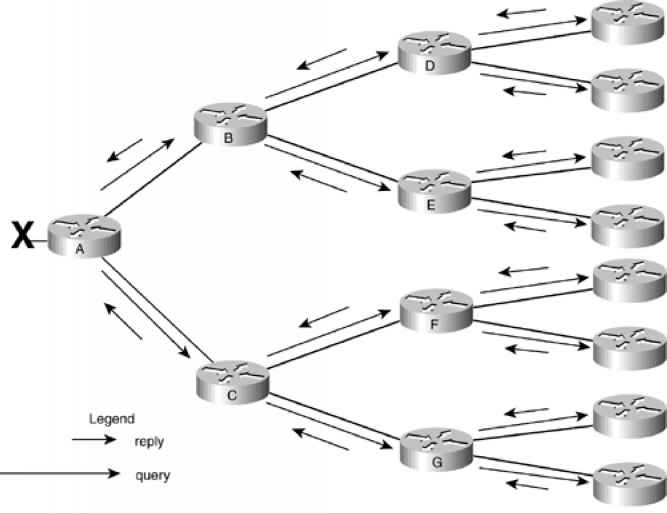
In Figure 7-10, Router A lost its Ethernet interface. Because it doesn't have a feasible successor, the route becomes active and Router A queries its neighbors, Router B and Router C. Now, Router B doesn't know how to reach the lost network, so it asks its neighbors, Router D and Router E. Similarly, Router C asks its neighbors, Router F and Router G. Because Routers D, E, F, and G also don't know how to reach the lost network, they query the downstream neighbors. At this point, the edge of the network is reached and the edge router doesn't have any more neighbors to query. The edge router then replies back to Routers D, E, F, and G. Those routers reply back to Routers B and C, and finally to Router A. The query process then stops. Figure 7-10 shows the cascade effect of the
EIGRP query process, in which the query travels from the original router to the edge of the network and back to the original router.
Determining Active/Stuck in Active Routes with show ip eigrp topology active
You must answer two questions to troubleshoot the EIGRP stuck in active problem:
Determining why the route is active is not a difficult task. Sometimes, the route that constantly is going active could be due to flapping link. Or, if the route is a host route (/32 route), it's possible that it is from a dial-in connection that gets disconnected. However, trying to deter-mine why the active route becomes stuck is a much harder task—and more important to learn. Usually, an active route gets stuck for one of the following reasons:
• Bad or congested links
• Low router resources, such as low memory or high CPU on the router
• Long query range
• Excessive redundancy
By default, the stuck in active timer is only three minutes. In other words, if the EIGRP neighbor doesn't hear a reply for the query in three minutes, neighbors are reset. This adds difficulty in troubleshooting EIGRP stuck in active because every time an active route is stuck, you have only three minutes to track down the active route query path and hopefully find the cause.
The tool that you need to troubleshoot the EIGRP stuck in active error is the show ip eigrp topology active command. This command shows what routes are currently active, how long the routes have been active, and which neighbors have and have not replied to the query. From the output, you can determine which neighbors have not replied to the query, and you can track the query path and find out the status of the query by hopping to the neighbors that have not replied. Example 7-9 shows sample output from the show ip eigrp topology active command.
Continue reading here: Example 713 Result of ping Test from Router D to Router E
Was this article helpful?