Dynamic NAT and PAT Implementation
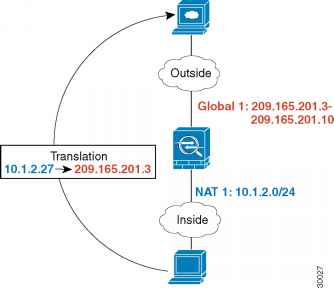
Figure 17-13 nat and global ID Matching
Web Server: www.cisco.com
- 10.1.2.27
See the following commands for this example:
hostname(config)# nat (inside) 1 10.1.2.0 255.255.255.0 hostname(config)# global (outside) 1 209.165.201.3-209.165.201.10
You can enter a nat command for each interface using the same NAT ID; they all use the same global command when traffic exits a given interface. For example, you can configure nat commands for Inside and DMZ interfaces, both on NAT ID 1. Then you configure a global command on the Outside interface that is also on ID 1. Traffic from the Inside interface and the DMZ interface share a mapped pool or a PAT address when exiting the Outside interface (see Figure 17-14).
Figure 17-14 nat Commands on Multiple Interfaces
Web Server: www.cisco.com
Figure 17-14 nat Commands on Multiple Interfaces
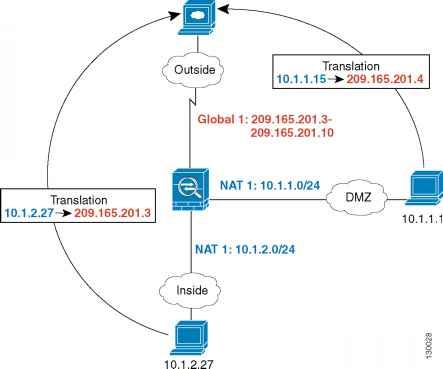
See the following commands for this example:
hostname(config)# nat (inside) 1 10.1.2.0 255.255.255.0 hostname(config)# nat (dmz) 1 10.1.1.0 255.255.255.0 hostname(config)# global (outside) 1 209.165.201.3-209.165.201.10
You can also enter a global command for each interface using the same NAT ID. If you enter a global command for the Outside and DMZ interfaces on ID 1, then the Inside nat command identifies traffic to be translated when going to both the Outside and the DMZ interfaces. Similarly, if you also enter a nat command for the DMZ interface on ID 1, then the global command on the Outside interface is also used for DMZ traffic. (See Figure 17-15).
Figure 17-15 global and nat Commands on Multiple Interfaces
Web Server: www.cisco.com
Figure 17-15 global and nat Commands on Multiple Interfaces
Web Server: www.cisco.com

See the following commands for this example:
hostname(config)# nat (inside) 1 10.1.2.0 255.255.255.0 hostname(config)# nat (dmz) 1 10.1.1.0 255.255.255.0 hostname(config)# global (outside) 1 209.165.201.3-209.165.201.10 hostname(config)# global (dmz) 1 10.1.1.23
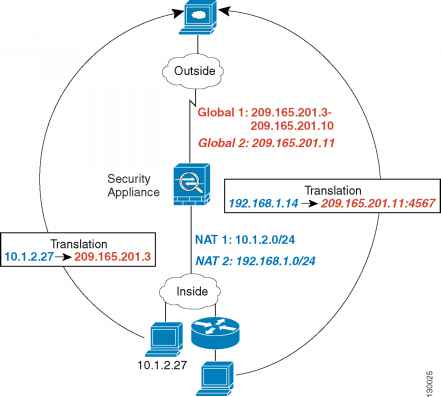
If you use different NAT IDs, you can identify different sets of real addresses to have different mapped addresses. For example, on the Inside interface, you can have two nat commands on two different NAT IDs. On the Outside interface, you configure two global commands for these two IDs. Then, when traffic from Inside network A exits the Outside interface, the IP addresses are translated to pool A addresses; while traffic from Inside network B are translated to pool B addresses (see Figure 17-16). If you use policy NAT, you can specify the same real addresses for multiple nat commands, as long as the the destination addresses and ports are unique in each access list.
Figure 17-16 Different NAT IDs
Web Server: www.cisco.com
Figure 17-16 Different NAT IDs
Web Server: www.cisco.com
- 192.168.1.14
See the following commands for this example:
hostname(config)# nat (inside) 1 10.1.2.0 255.255.255.0 hostname(config)# nat (inside) 2 192.168.1.0 255.255.255.0 hostname(config)# global (outside) 1 209.165.201.3-209.165.201.10 hostname(config)# global (outside) 2 209.165.201.11
You can enter multiple global commands for one interface using the same NAT ID; the security appliance uses the dynamic NAT global commands first, in the order they are in the configuration, and then uses the PAT global commands in order. You might want to enter both a dynamic NAT global command and a PAT global command if you need to use dynamic NAT for a particular application, but want to have a backup PAT statement in case all the dynamic NAT addresses are depleted. Similarly, you might enter two PAT statements if you need more than the approximately 64,000 PAT sessions that a single PAT mapped statement supports (see Figure 17-17).
Figure 17-17 NAT and PAT Together
Web Server: www.cisco.com
Figure 17-17 NAT and PAT Together
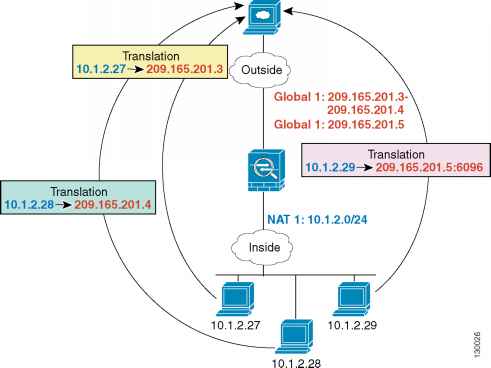
See the following commands for this example:
hostname(config)# nat (inside) 1 10.1.2.0 255.255.255.0 hostname(config)# global (outside) 1 209.165.201.3-209.165.201.4 hostname(config)# global (outside) 1 209.165.201.5
For outside NAT, you need to identify the nat command for outside NAT (the outside keyword). If you also want to translate the same traffic when it accesses an inside interface (for example, traffic on a DMZ is translated when accessing the Inside and the Outside interfaces), then you must configure a separate nat command without the outside option. In this case, you can identify the same addresses in both statements and use the same NAT ID (see Figure 17-18). Note that for outside NAT (DMZ interface to Inside interface), the inside host uses a static command to allow outside access, so both the source and destination addresses are translated.
| Chapter 17 Applying NAT_
Using Dynamic NAT and PAT I
Figure 17-18 Outside NAT and Inside NAT Combined
Figure 17-18 Outside NAT and Inside NAT Combined
- Translation 10.1.1.15^-209.165.201.4
Global 1: 209.165.201.3209.165.201.10
Inside
Translation
Undo Translation 10.1.1.5^-10.1.2.27
See the following commands for this example:
hostname(config)# nat (dmz) 1 10.1.1.0 255.255.255.0 outside hostname(config)# nat (dmz) 1 10.1.1.0 255.255.255.0
hostname(config)# static (inside,dmz) 10.1.1.5 10.1.2.27 netmask 255.255.255.255 hostname(config)# global (outside) 1 209.165.201.3-209.165.201.4 hostname(config)# global (inside) 1 10.1.2.30-1-10.1.2.40
When you specify a group of IP address(es) in a nat command, then you must perform NAT on that group of addresses when they access any lower or same security level interface; you must apply a global command with the same NAT ID on each interface, or use a static command. NAT is not required for that group when it accesses a higher security interface, because to perform NAT from outside to inside, you must create a separate nat command using the outside keyword. If you do apply outside NAT, then the NAT requirements preceding come into effect for that group of addresses when they access all higher security interfaces. Traffic identified by a static command is not affected.
Continue reading here: Configuring Dynamic NAT or PAT
Was this article helpful?
