Network Topologies

You already have been introduced to several different network topologies as you have read through this book. For instance, 10BASE2 networks use a physical bus topology, whereas 10BASE-T networks use a physical star topology. This section introduces you to several other types of network topologies.

Figure 11-1 shows the different types of Ethernet topologies covered earlier in the book, with some specific terms used to describe the topology for each design.

Figure 11-1 Different Types of Network Topologies for Ethernet So Far in This Book

Physical Bus Logical Bus

Hub1

Hub1

rrrrrrrrr

Switch 1

Physical Star Logical Bus

Physical Star Logical Star

Switch 1

The figure shows a 10BASE5 network, a 10BASE-T network using a shared hub, and a switch with 10/100 links. Physically, the topologies with the hub and the switch look a little like how a child might draw a star, or the sun, with a center (the hub or switch) and with beams of light pointing outward (like the Ethernet cables to the PCs in the figure). Star topologies also are called hub-and-spoke topologies.

Physical bus topologies transmit the electrical signal from one end of a cable to the other, with the signal being picked up at each connection point.

The term logical topology refers to how the network behaves. For instance, from Chapter 3, you know that a 10BASE-T hub repeats an incoming signal out every other port on the hub.

So, logically, it also causes the electrical signals to be sent to every connection on the network—more like a bus in logic. So, people might describe a network using a hub as a physical star, but a logical bus. The logical topology for the switch network is a star because, unlike a hub, a switch does not repeat the signal out every port, but just to the appropriate device.

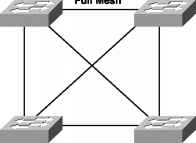
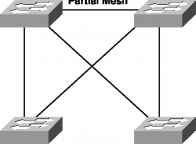
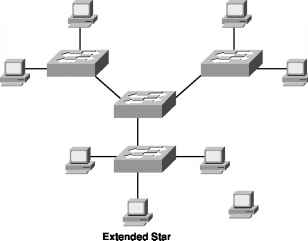
Figure 11-2 shows three other types of network topologies, which could be used for interconnecting Ethernet hubs and switches.

Figure 11-2 Extended Star, Full Mesh, and Partial Mesh

Figure 11-2 Extended Star, Full Mesh, and Partial Mesh
Switch Computer Topology
Ca all RMmoK

The extended star is characterized by parts of the topology that look like a star, which, in turn, are connected in star fashion to some other node. For instance, the three switches with PC attached, taken alone, form a star topology. By connecting to another switch in the middle, another star is formed, so this topology would be characterized as an extended star. Extended star topologies are rare for Ethernets.

If you pursue your CCDA certification, you will come across many designs in which you see the full mesh and partial mesh topologies shown in the figure. A full mesh is typical of switches that collectively form the core and distribution layers of a campus LAN design that includes Layer 3 switching. The partial mesh design often is found between distribution layer and access layer switches. If you want to learn more about LAN design concepts, pick up the CCDA Exam Certification Guide and read more. For our purposes, you should just know that a full mesh means that all the respective nodes in the network have a direct connection. A partial mesh means that some of the nodes in a network have a direct connection, but others do not.

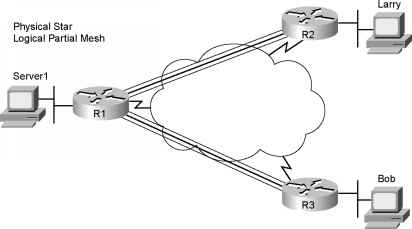
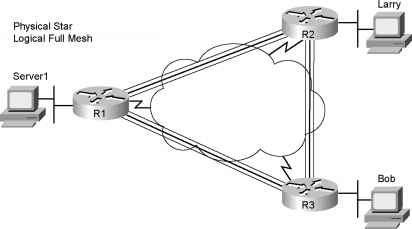
Frame Relay networks often are described as being full mesh or partial mesh. For instance, consider Figure 11-3, with a Frame Relay network.

Figure 11-3 Physical Star, with Full and Partial Mesh

Figure 11-3 Physical Star, with Full and Partial Mesh
Data Driven Network Topology

Frame Relay networks use a physical star topology because each Frame Relay DTE device connects to a central Frame Relay network. However, depending on which sites have VCs connecting them, the logical design is either full mesh or partial mesh. When you study for the ICND exam, you will see many Frame Relay examples with full- and partial-mesh designs. Practically, no one really refers to Frame Relay as using a physical star design, but many people do refer to a Frame Relay design as either full mesh or partial mesh.

Figure 11-4 shows the final topology covered here—the ring topology. Figure 11-4 Single-Ring and Dual-Ring Topologies a,

Figure 11-4 shows the final topology covered here—the ring topology. Figure 11-4 Single-Ring and Dual-Ring Topologies

Atlas Track Curve Dimensions

Physical Single Ring Logical Ring

Physical Dual Ring Logical Ring

* Token Ring Hub

Physical Single Ring Logical Ring

Physical Dual Ring Logical Ring

Physical Star Logical Ring

The left-most figure depicts a concept in which each device is cabled to the next, with the signal transmitted in a single direction. By doing so, the signal starts with one device, and eventually, the signal makes it all the way back to the original sender of the data. With one physical path, the topology is called a single ring, and with two physical paths, the topology is called a dual ring.

Dual rings are useful for failover. With dual rings, one ring is used to transmit data under normal operations, with the second ring for failover. If the physical path between two adjacent devices fails, the two devices on either side of the problem simply can loop the signal on one ring onto the other—and another physical loop has been created. This dual-ring topology was used with the now outdated Token Ring and Fiber Distributed Data Interface (FDDI) LANs. The same concept is used in optical networking today.

Finally, on the right side of Figure 11-4, you see an example of how Token Ring was cabled— back when anyone cared. Each device had a cable connecting it to a hub, with a transmit wire and a receive wire inside the cable. The electrical signal was sent down each wire and was repeated back up the wire to the hub; then the hub repeated the process with the next device, and so on. Electrically, a single ring was created, so Token Ring uses a logical ring topology, but physically, it uses a star topology.

Table 11-2 summarizes the types of physical topology covered in this chapter. Table 11-2 Physical Topology Types

Readers' Questions

  • abraham
    What are the five basic topology types?
    1 month ago
  • The five basic topology types are:
    1. Bus Topology
    2. Star Topology
    3. Ring Topology
    4. Mesh Topology
    5. Tree Topology
    • harriet
      Which network topology requires computers to possess a token in order to send data over the network?
      1 month ago
    • The network topology that requires computers to possess a token in order to send data over the network is known as Token Ring topology. In this topology, a token is passed from one computer to another in a sequential manner, and only the computer possessing the token is allowed to transmit data. Once a computer completes data transmission, it releases the token, allowing the next computer in the sequence to access and transmit data.
      • haylom
        Which network topology connects network nodes through a central device, usually a hub or a switch?
        1 month ago
      • The network topology that connects network nodes through a central device, usually a hub or a switch, is called a star topology.
        • dieter
          What device is used to make a physical star topology?
          1 month ago
        • A network switch or hub is typically used to create a physical star topology. Each device in the network is connected directly to the switch or hub, and all communication between devices flows through this central point.
          • poppy
            What kind of network would use pointtopoint, hub and spoke, or mesh topologies?
            1 month ago
          • Various types of networks can use point-to-point, hub and spoke, or mesh topologies. Some examples include:
            1. Wide Area Networks (WANs): WANs connect geographically dispersed locations. Point-to-point, hub and spoke, or mesh topologies can be used depending on factors like cost, performance requirements, and network layout. For instance, a company might use a point-to-point connection between its headquarters and a branch office, while employing a hub and spoke topology to connect the branch offices.
            2. Local Area Networks (LANs): LANs are typically used within a limited area like a home, office, or campus. Point-to-point connections can be used to directly connect two devices within the LAN, while hub and spoke topology may involve a central device (like a switch or router) acting as a hub to which other devices connect. In larger LANs, mesh topologies may be used to establish direct connections between multiple devices for improved redundancy and communication flexibility.
            3. Internet Service Provider (ISP) Networks: ISPs often deploy a combination of point-to-point, hub and spoke, and mesh topologies in their networks. Point-to-point connections may be used for direct links between different ISPs, hub and spoke topology can be utilized for connection to end users, while mesh topology might be employed for establishing peering connections between various ISPs for enhanced network robustness.
            4. Data Centers: Data centers commonly make use of point-to-point, hub and spoke, and mesh topologies. Point-to-point links can be used for connecting servers to storage devices or for interconnecting data centers. Hub and spoke topology can be observed in the form of servers connected to a central switch, while mesh topology might be utilized to connect critical components (such as switches or routers) for redundancy and fault tolerance.These are just a few examples, and different types of networks can employ these topologies based on their specific requirements and constraints.
            • jeffrey
              Which topology allow equal access to each node?
              3 months ago
            • A mesh topology allows equal access to each node, which is achieved by interconnecting each node to every other node in the network.
              • arthur
                Which of the following is a basic network topology?
                3 months ago
              • -Bus topology
                • jessica
                  What is the most common topology and technology combination in use today?
                  4 months ago
                • The most common topology and technology combination in use today is the star topology and Ethernet technology. The star topology is a network topology with each node (such as computers and printers) connected to a central device like a hub or switch. By using Ethernet technology, this setup also allows for communication between these nodes and a central device to share resources and information. This efficient setup is the most popular choice for both home and corporate networks.
                  • dennis
                    Which statement describes a result after multiple cisco lan switches are interconnected?
                    5 months ago
                  • After multiple Cisco LAN switches are interconnected, they will be able to create a larger, more powerful network, which will enable users to access and share resources across multiple locations.
                    • paola
                      Which is network topology that is easy to build?
                      5 months ago
                    • and maintain Point-to-Point topology is a simple network topology that is easy to build and maintain. In this type of network, two nodes are connected directly through an Ethernet, serial, or other cable. There is no need for a central hub or switch, making this type of topology incredibly simple to set up. Because of the direct connection between two nodes, the bandwidth is always available and all devices can communicate directly. As a result, there is no need to manage any additional routing information or IP address assignments, making this topology even easier to maintain.
                      • Yemane Russom
                        What is network topology explain different types of topologies?
                        5 months ago
                      • Network topology is the arrangement of the various elements (links, nodes, etc.) of a computer network. It is the physical or logical layout of a network. There are seven common types of network topologies: bus, star, mesh, ring, tree, hypercube, and hybrid. Bus Topology: In a bus topology, all nodes are connected to a common transmission cable or backbone, creating a single electrical path or circuit. If the network bus is broken, any node connected to the bus will be disconnected. Star Topology: In star topology, all nodes are directly connected to a central hub or switch. The star topology is much easier to manage than the bus topology and is capable of supporting many nodes. However, if the central switch fails, the entire network will go down. Mesh Topology: In a mesh topology, each node is connected to every other node in the network. All nodes send and receive signals to each other, instead of sending them to a single hub or switch. This type of topology is incredibly reliable, but it is also expensive and difficult to set up. Ring Topology: In a ring topology, all nodes are connected together in a closed loop structure. Data is sent from one node to another in a sequential, circular order. This type of topology is more reliable than a bus topology, but the entire network will be affected if one node fails. Tree Topology: In a tree topology, all nodes are connected to a central hub, just like in a star topology. However, the difference is that the secondary hubs, or branches, can be connected to other nodes, forming a tree-like structure. This type of topology is best suited for larger networks, as it is easy to expand and manage. Hypercube Topology: In a hypercube topology, all nodes are connected to each other in a 3-dimensional structure. This type of topology is most commonly used for high performance computing and for supercomputer applications. Hybrid Topology: A hybrid topology is a combination of two or more different types of topologies. For example, a mesh topology can be combined with a star topology to create a hybrid topology. This type of topology is more reliable and efficient than using a single type of topology.
                        • Savanna
                          What are the different types of network topologies explain?
                          5 months ago
                        • Network topologies refer to the arrangement of the various elements (links, nodes, etc.) of a computer network. The most common network topologies are: 1.Bus Topology: It is a linear topology where all the nodes are connected to a single backbone cable which acts as a shared communication medium. 2.Ring Topology: In this topology, the workstations are connected in a circular or ring-like structure. All the nodes are connected to each other through a single cable in the form of a closed loop. 3.Star Topology: It is a popular network topology where all the nodes are connected to a central node through individual cables. 4.Mesh Topology: In this topology, all the nodes are connected to each other through individual cables. This type of topology allows for full redundancy and fault tolerance. 5.Tree Topology: It is a hybrid topology consisting of star and bus topology. In this topology, all the nodes are connected to the root hub which acts as a central control unit. 6.Hybrid Topology: This topology is a combination of two or more of the above-mentioned topologies. This topology provides the benefit of both the individual topologies.
                          • toni
                            How does a starwired bus topology work?
                            6 months ago
                          • Star wired bus topology is a type of network topology where all of the nodes are connected via a central cable, which is usually referred to as a bus or backbone. This cable is connected to each device on the network using a separate cable (the “star” part of the topology), so each device has its own dedicated connection to the bus. The bus is used to transfer data between all of the devices. It is easy to expand this type of network by simply adding additional devices that are connected to the bus with their own “star” cables. The disadvantage of this topology is that it can be difficult to troubleshoot due to the complexity of the wiring.
                            • fedele
                              What is network topology explain the different types of topology?
                              7 months ago
                            • Network topology is the physical or logical arrangement of the various elements (links, nodes, etc.) of a computer network. Network topology is an important factor in determining how efficiently a network performs and how easy it is to manage. The four main types of network topology are:
                              1. Bus topology: In a bus topology, all devices are connected to a common backbone, or cable. This type of topology is relatively easy to set up but is also very susceptible to failure as the entire network depends on the backbone.
                              2. Ring topology: In a ring topology, each device is connected to two other devices, forming a closed loop. Each device receives and sends signals to the two devices it is connected to and those signals move from device to device around the ring.
                              3. Star topology: In a star topology, each device is connected to a central hub or switch. All data passes through the central hub, which makes it easy to manage the network. However, if the central hub fails, the entire network will fail.
                              4. Mesh topology: In a mesh topology, each device is connected to every other device in the network. This type of topology offers more fault tolerance than other topologies, as if one device fails, the data can be routed around it. However, as the number of devices increase, the number of connections required also increases.
                              • Martina
                                Which type of topology requires a hub?
                                7 months ago
                              • The type of topology that requires a hub is a star topology. In a star topology, all nodes (computers and other network devices) are connected to a central hub, which acts as a gateway for data transmission.
                                • Gregory
                                  Which connector is used to connect a new device in the bus topology?
                                  7 months ago
                                • A bus topology uses a single cable (known as the bus or backbone) to connect all the devices in the network. To connect a new device, one of the two connectors on each end of the bus (known as T connectors) is used. This connector essentially 'splits' the bus so that the new device can be connected to the existing bus using a patch cable.
                                  • brunilde
                                    Which type of topology is best suited with lan connection?
                                    7 months ago
                                  • The best topology for a LAN connection is a star topology. This type of topology ensures that all of the devices in the network are connected to a central hub or switch, and all traffic passes through that central point. This allows for better control and management of the network and easier troubleshooting if any issues arise.
                                    • johanna
                                      Which connection physically connects the end device to the network?
                                      7 months ago
                                    • A network cable, such as an Ethernet cable, is typically used to connect an end device to a network.
                                      • ville
                                        What statement describes ethernet?
                                        7 months ago
                                      • Ethernet is a type of local area network (LAN) technology that uses a special kind of cabling and signaling standard to send and receive data. It is the most commonly used LAN technology and is used in almost all LANs today.
                                        • PATRIZIO
                                          Which of the following describes the arrangement of network cabling between devices?
                                          7 months ago
                                        • Point-to-Point
                                          • Maja
                                            What does a linear bus topology use to connect all network devices?
                                            7 months ago
                                          • A linear bus topology uses a single cable (or bus), connected in a line, to connect all of the computers, peripherals, and other network devices. Each device is connected directly to the bus and ends of the bus must be terminated.
                                            • HABEN
                                              Which type of network topology connects multiple devices to a central device?
                                              7 months ago
                                            • Star Network Topology
                                              • kaelyn
                                                What topology is also called a linear bus?
                                                7 months ago
                                              • A linear bus topology is also known as a bus topology.
                                                • steffen hahn
                                                  Which topology has all of the computers on the network connecting to a central wiring point?
                                                  7 months ago
                                                • Star Topology
                                                  • silvana
                                                    How does a ring topology connect devices?
                                                    7 months ago
                                                  • In a ring topology, devices are connected in a loop, with each device connecting to two other devices to form a single continuous path for signals to travel around. Data flows in one direction around the ring, with each device along the way handling the data and then passing it on to the next device. The ring topology is considered to be a highly reliable network configuration since signals do not have to travel through multiple nodes before reaching their destination. It is also relatively easy to add new devices to the network, as long as they are connected in the correct order.
                                                    • Moro
                                                      Which of the following topologies connects each network device to a central hub?
                                                      8 months ago
                                                    • Selina
                                                      Which physical topologies are used with ethernet networks?
                                                      8 months ago
                                                    • The following physical topologies can be used with Ethernet networks:
                                                      1. Star Topology
                                                      2. Ring Topology
                                                      3. Bus Topology
                                                      4. Mesh Topology
                                                      5. Point-to-Point Topology
                                                      6. Hybrid Topology
                                                      • Atte
                                                        What does physical topology of a network refer to?
                                                        8 months ago
                                                      • Physical topology of a network refers to the actual layout of the computers, network devices, and cabling used to connect them. It is the physical design of a network, including the location of nodes, the cable installation, and the configuration of the cables and other networking components.
                                                        • jesse
                                                          Which of the following topologies are used with ethernet networks?
                                                          8 months ago
                                                          1. Bus Topology
                                                          2. Star Topology
                                                          3. Ring Topology
                                                          4. Mesh Topology
                                                          • futsum selassie
                                                            Which of the following topologies connects each device to a central hub?
                                                            8 months ago
                                                          • madoc hogpen
                                                            What are the five main types of physical network topologies?
                                                            8 months ago
                                                            1. Bus Topology
                                                            2. Star Topology
                                                            3. Ring Topology
                                                            4. Mesh Topology
                                                            5. Tree Topology
                                                            • johnny
                                                              Which of the following topologies connects?
                                                              8 months ago
                                                            • Mesh Mesh topology connects multiple nodes together in a network in which all nodes are interconnected with one another.
                                                              • j
                                                                Which statement describes the physical topology for a lan?
                                                                8 months ago
                                                              • The physical topology of a LAN describes the physical arrangement of the network, including the individual cables, the length of each cable, the placement of the computers and other devices, and the type of connectors used to connect the devices.
                                                                • NEFTALEM TEMESGEN
                                                                  What device is used to create a physical star topology?
                                                                  8 months ago
                                                                • A hub or switch is used to create a physical star topology.
                                                                  • danny
                                                                    What type of logical topology is at work when using an ethernet hub?
                                                                    8 months ago
                                                                  • A star topology is at work when using an Ethernet hub.
                                                                    • debora
                                                                      Which statement describes an extended star topology?
                                                                      8 months ago
                                                                    • An extended star topology consists of a central hub or switch that is connected directly to other nodes or switches, which are then connected to individual nodes or devices in a star format.

                                                                      Disclosure: Some of the links above are affiliate links. This means that, at zero cost to you, I will earn an affiliate commission if you click through the link and finalize a purchase.

                                                                      Term

                                                                      Definition

                                                                      Bus

                                                                      This is a linear topology, with all devices connected to the cable.

                                                                      Star

                                                                      Each device is connected to a central point. Sometimes called hub-and-spoke.

                                                                      Extended star

                                                                      A star topology is in the center, but instead of each point being a single device, it can be the center of another star topology.

                                                                      Full mesh

                                                                      Each device has a direct connection to each other device.

                                                                      Partial mesh

                                                                      Each device does not have a direct connection to each other device.

                                                                      Single ring

                                                                      Each device is connected directly to two others so that the signal is repeated in one direction, creating a ring or loop.

                                                                      Dual ring

                                                                      Two rings go through the same set of devices, allowing loops to be made upon failure, which continues the operation of a ring.

                                                                      Continue reading here: Unshielded Twisted Pair and Shielded Twisted Pair Cabling and Connectors

                                                                      Was this article helpful?

                                                                      +2 0